
Nowadays, recovering old photos on your cell phone has become much easier, mainly because apps with artificial intelligence can restore old images and improve their appearance directly on your smartphone.
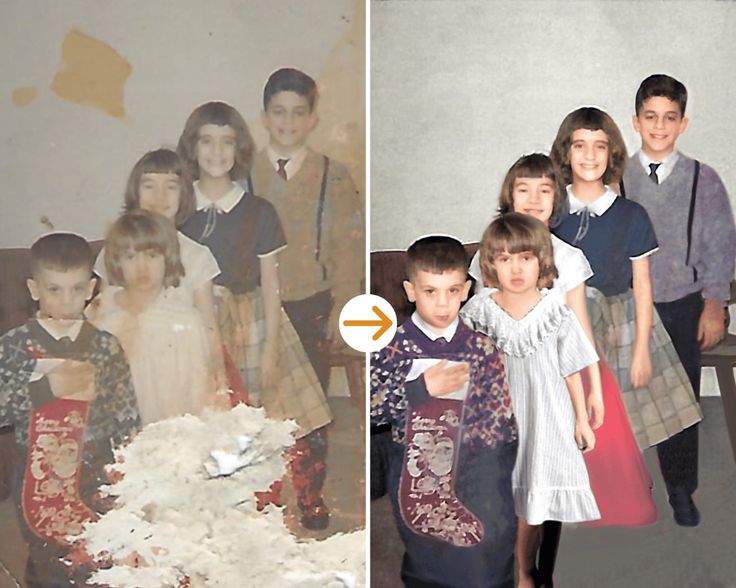
Furthermore, artificial intelligence tools have become popular because they can analyze old photographs, correct some visual problems, and improve details that previously required more complex programs. In this way, restoring a retro image can be much simpler for those who wish to preserve their memories.
Therefore, this type of application is useful in various situations, such as recovering old family photographs, improving digitized images, restoring travel records, or giving old photos a sharper appearance. Thus, the cell phone becomes a practical tool for preserving these memories.
## 📱 Remini: Restore old photos with artificial intelligence
Among apps focused on image enhancement and restoration, Remini has become one of the best-known options for those who want to improve old photos using artificial intelligence. Furthermore, its aim is to simplify the process for users who want to transform old images into sharper versions directly from their mobile phones.
### What is Remini?
Remini is an AI-based photo enhancement app. It can analyze an image and apply improvements to increase sharpness and highlight specific details.
For those looking for a retro photo restoration app, this tool can be particularly useful when the original image is blurry, low-resolution, or has barely visible details.
However, it's important to understand the difference between restoring and recovering a photograph. The app can improve an image you still have, but that doesn't mean it can automatically find a photo that has been permanently deleted from your phone.
### How does AI-powered restoration work?
The process is relatively simple. First, the user chooses a photograph available on their device or from a compatible source. Then, the application processes the image using artificial intelligence capabilities.
Thus, certain details can become more defined, while characteristics of the photograph can be enhanced. The result, naturally, depends on the quality of the original image and the type of problem present in it.
Furthermore, old photographs may have scratches, smudges, low resolution, or blur. Artificial intelligence can help in some of these cases, although there is no guarantee that all defects will be perfectly corrected.
Therefore, the main goal is to improve the appearance of the existing image, not to magically recover files that have completely disappeared. Technology has evolved considerably, but it still lacks the power to resurrect pixels that never made it into the application.
### Main features of the application
One of Remini's most interesting features is photo enhancement. This allows older images to receive improvements in definition and detail perception.
Furthermore, the application can be used to enhance different types of images, depending on the features available in the version used. Therefore, it doesn't need to be limited exclusively to old photographs.
Another important point is practicality. Instead of using a computer with complex software, the user can perform the process directly from their smartphone.
Therefore, anyone wishing to restore a retro photo can select the image, apply the available feature, and check the result on their own mobile phone.
### Old family photos
Family photographs are one of the cases where this type of application can be especially interesting. After all, old images were often taken with cameras of lower quality than current ones and may show a loss of definition.
In this way, an old digitized photograph can receive enhancements that help to highlight faces, contours, and other elements present in the image.
Furthermore, the process can be useful for preserving photographs that are physically deteriorated. In this case, it is important to first scan the photograph and then use the application to work on the digital copy.
Therefore, before attempting to restore an old photograph, try to keep the original file as well. This way, you'll have a backup copy in case you don't like the result produced by the artificial intelligence.
### How to download Remini
To download the app on Android, search for Remini in the Play Store and check the information on the official page before downloading.
On iPhones, the process can be done through the App Store. Simply search for the app's name, review the available information, and begin the installation.
Furthermore, it is recommended to use only official app stores. This way, you reduce the risk of installing modified versions or unknown files that promise unlimited recovery features.
### How to install and start using
After installing the application, open Remini and follow the on-screen instructions. Depending on the version and available features, some functions may require login or have specific usage conditions.
Next, select the photograph you wish to enhance. Therefore, when working with a retro photo, it's advisable to use the best digital copy available.
After processing, carefully observe the result. This way, you can compare the original image with the enhanced version and decide if the alteration truly improved the photograph.
Is the app free?
Remini may offer free features as well as limitations or paid features, depending on the version and current service conditions. Therefore, it is not correct to state that all restoration tools will always be available for free.
Furthermore, plans, credits, and terms of use may change. Therefore, it's best to check directly in the app or official store to see which features are currently available.
Those who wish to download the app for free can look for the official version on the Play Store or App Store, but it is important to review the terms and conditions before using any paid features.
### Android and iPhone
The app can be found for mobile devices compatible with Android and iOS. Therefore, users of different smartphones can search for Remini in their respective official app stores.
However, the requirements may vary depending on the app version and operating system. Therefore, if the download is not available for a particular device, check the information provided in the store.
Furthermore, image processing using artificial intelligence may require an internet connection and specific service resources. Therefore, the time required to process a photograph can vary.
Security and privacy
When using AI-powered restoration apps, it's important to pay attention to privacy, especially since photographs may contain faces and personal information.
Therefore, before sending an image, check the privacy information and terms presented by the application. This way, you will have a clearer understanding of how the data and images you send may be handled.
Furthermore, avoid using modified versions or applications found on unknown websites. This will reduce the risks associated with tampered software.
For very personal photographs, it can also be a good idea to always keep an original copy stored in a safe place before undertaking any editing process.
### In which situations is the app most useful?
Remini can be useful for restoring old family photographs, improving digitized images, or enhancing records that have become blurry over the years.
During travel, for example, it can help improve old photographs that have been digitized and stored on a cell phone. Similarly, students and researchers can use enhancement tools when they need to better visualize certain elements of an image.
Furthermore, people who work with digital content can use enhancement tools to prepare old photographs before sharing them.
On the other hand, it's important not to confuse enhancement with recovering deleted files. If a photo has been permanently deleted and no copy exists, an AI-powered restoration app won't necessarily be able to recover it.
## Main features that make the app stand out
Remini's main feature is the use of artificial intelligence to enhance images. This makes the enhancement process simpler than with traditional editing software.
Furthermore, the ability to do everything via mobile phone makes the tool accessible to users who do not have advanced knowledge of image editing.
Another benefit is the ease of testing different photographs. The user can select an old image and see how the processing changes its appearance.
Artificial intelligence can also be particularly useful in photographs where important details are poorly defined. However, the result depends heavily on the quality of the original material.
Therefore, it is recommended to use good quality digital photographs whenever possible. A sharper original image offers better conditions for any enhancement process.
Advantages of restoring retro photos with AI.
One of the main advantages is practicality. Instead of spending hours using professional tools, the user can perform a good part of the process directly through their smartphone.
Furthermore, artificial intelligence automates several steps that could be difficult for beginners. In this way, even those without editing experience can experiment with restoration features.
Another benefit is the ability to preserve old memories. Physical photographs can suffer wear and tear, while a digital copy can be stored and organized more easily.
Therefore, digitizing old photographs and then using enhancement tools can be an interesting strategy for preserving family records.
However, AI can also alter some details of the original image. Therefore, a restored photograph should be considered an enhanced version, and not necessarily a perfect reproduction of the original appearance.
## Tips for getting the most out of the app
First, use the best original photograph available. The higher the quality of the image submitted, the better the conditions tend to be for processing.
Additionally, avoid working exclusively with a screenshot or an extremely compressed image. This way, you preserve more information for artificial intelligence processing.
Another tip is to always compare the result with the original. This way, you can see if the restoration actually improved the photograph or if it ended up creating artificial details.
It is also important to keep the original version separate. Therefore, never replace the original file with the modified version without keeping a copy.
Finally, explore the features available in the app, but don't overdo it with the filters. An effective restoration should improve the image without transforming an old photograph into something that looks like it was produced by a particularly enthusiastic robot.
## Conclusion
Remini is an interesting alternative for those who want to restore and enhance retro photos using artificial intelligence directly from their mobile phone. Furthermore, its approach simplifies the process for those who want to improve old photographs without relying on professional software.
Therefore, anyone who has old family photos, digitized images, or low-resolution photographs can download the app from the Play Store or App Store and test the available features.
However, it's important to remember that AI-powered restoration is not the same as recovering a permanently deleted photo. Therefore, the app works best when you still have the original image and want to improve its quality.
Therefore, to preserve old memories, a good strategy is to keep the original photographs, create digital copies, and use artificial intelligence tools to enhance these images. In this way, old memories can gain a new look without ceasing to exist the original version.